
The Question That Started This
A cybersecurity content creator posted a video saying you can decrypt captured HTTPS traffic in Wireshark if "the server has TLS key logging enabled." That sounded close to true, but the framing felt wrong in a way I wanted to dig into. So I spent an evening building a controlled lab to actually do it end to end, on infrastructure I own, and write up what I found.
The short version: the technique works, but the description was misleading in a way that matters. The keys never travel over the network. The endpoint that has them writes them out to a local file, and Wireshark reads that file from disk to decrypt traffic it already captured. There's no key capture in transit. There's an endpoint volunteering its own session secrets through a documented debugging mechanism.
What the exercise turned into was much bigger than the original question. By the end of the night I had decrypted the TLS session, pulled a JWT out of the cookie, decoded the user record inside it, extracted an MD5 password hash from that record, and run multiple GPU cracking attempts against it. The cracking arc on its own ended up being a better security lesson than the decryption that produced it.
How TLS Decryption with SSLKEYLOGFILE Actually Works
Modern TLS (1.2 and 1.3) derives session keys on both endpoints independently using Diffie-Hellman. The math is set up so that the two parties can agree on a shared secret without ever transmitting the secret itself. That property is why TLS works at all. A passive observer on the network sees the public values exchanged during the handshake but cannot compute the shared secret from them.
That public value exchange is the only thing on the wire. The session keys themselves stay in memory on each endpoint and never appear in any packet. Even with perfect forward secrecy in TLS 1.3, the server's long-term private key cannot be used to recover past session traffic. Every session has its own ephemeral key material.
The SSLKEYLOGFILE environment variable is a debugging hook implemented in most modern TLS libraries (NSS, BoringSSL, OpenSSL with the right callbacks, .NET, Java with flags, and so on). When the env var is set to a file path, the TLS library writes the per-session key material it just derived to that file in NSS Key Log Format. Wireshark reads the file, matches the secrets against the encrypted records in a capture, and decrypts the application data locally.
The format is plain text and looks like this:
CLIENT_HANDSHAKE_TRAFFIC_SECRET <32-byte client random> <48-byte secret>
SERVER_HANDSHAKE_TRAFFIC_SECRET <32-byte client random> <48-byte secret>
CLIENT_TRAFFIC_SECRET_0 <32-byte client random> <48-byte secret>
SERVER_TRAFFIC_SECRET_0 <32-byte client random> <48-byte secret>
That's it. The client random is the identifier Wireshark uses to match a key entry against a TLS session in a capture. The secret is the actual key material derived during the handshake.
Why This Isn't a TLS Vulnerability
The framing in the original video implied this was some kind of weakness in TLS. It isn't. Two reasons.
First, the entire mechanism requires endpoint cooperation. The server-side or client-side TLS library has to actively write out its own session keys to disk. There is no way for a third party on the network to extract these keys passively. If an attacker has the access required to set SSLKEYLOGFILE on a target endpoint and read the file later, they already have code execution on the box, which means they have easier paths to the same data: read browser memory, hook the HTTP library, dump credentials directly.
Second, TLS was never designed to hide traffic from the endpoints participating in the conversation. The threat model is network-level eavesdroppers between the client and server. The client and the server are both inside the trust boundary by definition. SSLKEYLOGFILE just gives you, the endpoint operator, a clean way to share what you already have with an analysis tool running on the same machine.
The real takeaway for security practitioners: if your threat model assumes TLS protects sensitive data from the endpoint that's processing it, your threat model has a hole in it. Pen testers reverse-engineer mobile app APIs this way every day. Forensic analysts use it for malware analysis. It's a feature, not a flaw.
Why I Built the Lab Locally Instead of Capturing Real Traffic
The simplest demo of SSLKEYLOGFILE is just setting it and browsing to any public HTTPS site. That works fine for proving the technique, but it has two problems for a write-up. The screenshots would show real traffic to a real third-party service, which is awkward both ethically and legally. And the captured content wouldn't be obviously interesting. TLS hides a lot, but a lot of what it hides is boring API calls or static assets.
A self-hosted target solves both. I can plant deliberately interesting data in the responses (credentials, tokens, session cookies), capture every byte of it, and not worry about whose data I'm looking at. OWASP Juice Shop is the obvious choice because it's an intentionally-vulnerable web application that the security community already recognizes, and it generates the exact kinds of payloads that make for good screenshots: login POSTs with email and password in JSON bodies, JWT tokens in cookies, REST API calls returning user data.
So the lab needs four things: a backend application that produces interesting traffic, a reverse proxy that terminates TLS with a cert my workstation will trust, a way to capture the traffic on my workstation, and the SSLKEYLOGFILE side of the equation to feed Wireshark.
The Stack
Everything except the Wireshark side lives in my Proxmox lab on an Ubuntu VM running Docker. I already had Nginx Proxy Manager (NPM) running on that VM for other services, so I leaned on it instead of standing up raw nginx.
Server side (Ubuntu VM at 10.10.0.100)
- OWASP Juice Shop in a Docker container, exposed on port 3000 inside the Docker network
- Nginx Proxy Manager handling TLS termination and reverse proxying to Juice Shop
- mkcert installed to generate a locally-trusted CA and an X.509 cert for
lab.local
Client side (Windows 11 workstation)
- mkcert root CA imported into the Windows Trusted Root store via
certutil SSLKEYLOGFILEset as a system environment variable pointing atC:\Temp\keys.log- Hosts file entry mapping
lab.localto the Ubuntu VM's IP - Wireshark with the keylog path configured in TLS preferences
- Hashcat for the eventual cracking work, paired with an RTX 3060 and SecLists
Spinning Up Juice Shop
One Docker command, one network attachment. Both containers need to be on the same Docker network so NPM can resolve juice-shop by hostname.
docker network create labnet

docker network connect labnet nginx-proxy-manager

docker run -d \
  --name juice-shop \
  --network labnet \
  --restart unless-stopped \
  bkimminich/juice-shop
Quick sanity check from inside the NPM container to confirm it can reach Juice Shop by name:
docker exec nginx-proxy-manager curl -sI http://juice-shop:3000Should return HTTP/1.1 200 OK with headers including X-Recruiting: /#/jobs, which is a Juice Shop signature.
The Certificate: mkcert
I wanted a real cert (no browser warnings cluttering the screenshots) without dealing with public DNS for an internal-only hostname. mkcert is perfect for that. It generates a local CA, installs the root cert into your OS trust store, and signs certs for whatever hostnames you specify. The result is indistinguishable from a public CA cert from the browser's perspective, as long as the root CA is trusted on the client machine.
On the Ubuntu VM:
sudo apt install -y libnss3-tools
curl -JLO "https://dl.filippo.io/mkcert/latest?for=linux/amd64"
chmod +x mkcert-v*-linux-amd64
sudo mv mkcert-v*-linux-amd64 /usr/local/bin/mkcert

mkdir ~/lab-certs && cd ~/lab-certs
mkcert lab.local
That produces lab.local.pem (the cert) and lab.local-key.pem (the private key). Both need to be uploadable to NPM later.
The root CA itself lives in $(mkcert -CAROOT) on the VM. I copied rootCA.pem over to my Windows machine via scp.
Trusting the Root CA on Windows
This is the step where the first gotcha showed up.
I had Gpg4win installed from some prior experimentation, and Kleopatra had registered itself as the default handler for .crt files. Double-clicking the cert pops Kleopatra, which then errors out because rootCA.pem is an X.509 cert, not a PGP key. Mildly annoying. The fix is to skip the GUI entirely.
From an admin Command Prompt:
certutil -addstore -f "Root" C:\Temp\rootCA.crtThat imports the cert into the Local Machine Trusted Root Certification Authorities store. Verify it took:
certutil -store "Root" | findstr /i "mkcert"Output should show the mkcert CA with the subject CN=mkcert <user>@<hostname>. Chrome will now accept any cert signed by this CA without warnings.
Setting Up the Proxy Host in NPM
Two pieces in the NPM web UI. First, upload the cert. Custom Certificate, name it lab.local, upload the two pem files (the -key file as the private key, the other as the cert, intermediate field blank).
Second, create the Proxy Host:
- Domain Names:
lab.local - Scheme:
http - Forward Hostname/IP:
juice-shop - Forward Port:
3000 - Websockets Support: enabled (Juice Shop uses them)
- SSL tab: pick the
lab.localcert, enable Force SSL and HTTP/2
ERR_SSL_UNRECOGNIZED_NAME_ALERT.
That error means nginx doesn't have a server block listening for the SNI hostname you sent. The cert is uploaded but isn't bound to anything yet. Finishing the Proxy Host configuration resolves it instantly.
The Windows Side: Hosts File and SSLKEYLOGFILE
Hosts file entry first. From an admin PowerShell:
Add-Content -Path C:\Windows\System32\drivers\etc\hosts -Value "`n10.10.0.100`tlab.local"Verify with ping lab.local. It should resolve to 10.10.0.100.
Then the env var, set machine-wide so it survives reboots and applies to all processes:
[Environment]::SetEnvironmentVariable("SSLKEYLOGFILE", "C:\Temp\keys.log", "Machine")
mkdir C:\Temp -ForceIf Chrome is already running when you set the env var, it won't pick it up. You have to fully kill every chrome.exe process, including background ones, before launching fresh. The cleanest way:
Get-Process chrome -ErrorAction SilentlyContinue | Stop-Process -ForceTo smoke-test the client side before getting into the lab traffic, launch Chrome and browse to any HTTPS site (google.com, your bank, whatever). Then check the keylog:
Get-Content C:\Temp\keys.logYou should see a stack of CLIENT_HANDSHAKE_TRAFFIC_SECRET and SERVER_HANDSHAKE_TRAFFIC_SECRET lines. If the file is empty or missing, Chrome didn't pick up the env var. If it's populated, the client half of the setup is working.
The Tailscale Wrinkle
Once everything was running, I started Wireshark to capture, ran a ping -t lab.local to identify the right interface by activity, and immediately ran into something I didn't expect. The loopback adapter was lighting up with traffic that should have been going out a physical NIC. My ethernet was at 192.168.1.91 and Juice Shop was at 10.10.0.100, so traffic should have been crossing my router. Instead, the routing lookup told a different story:
Find-NetRoute -RemoteIPAddress 10.10.0.100 | Select InterfaceAlias, NextHop

InterfaceAlias IPAddress       NextHop
-------------- ---------       -------
Tailscale      100.82.19.125
Tailscale                      100.100.100.100
This is when I remembered I'm running Tailscale on my pfSense VM as a subnet router. pfSense is advertising 10.10.0.0/24 into my Tailscale mesh, so my workstation takes the WireGuard tunnel to reach the lab subnet instead of the physical LAN path. That's actually how it should be configured. Tailscale handles the routing between my devices and the lab network, and I forgot it was in the picture.
Which is fun for the post, because it means there are now two encryption layers between my browser and Juice Shop:
- WireGuard for the Tailscale tunnel
- TLS 1.3 for the HTTPS session inside it
Capturing on the Tailscale virtual interface shows traffic after WireGuard has been stripped off locally, so what Wireshark sees is clean TLS packets. The SSLKEYLOGFILE approach works identically. The WireGuard layer is decrypted by my Tailscale daemon before the packets ever hit the virtual interface, and the TLS layer is decrypted by Wireshark using the keylog. Both encryption layers, both transparent to me, neither broken in any meaningful sense. They were never trying to hide my own traffic from me.
The Capture
In Wireshark, configure the keylog file path under Edit → Preferences → Protocols → TLS → "(Pre)-Master-Secret log filename" pointing at C:\Temp\keys.log. Confirm HTTP/2 is enabled under Protocols → HTTP2 (it will be, since NPM negotiated h2).
Clear the keylog for a fresh capture session, kill Chrome for a clean TLS state, start the Wireshark capture on the Tailscale interface with display filter ip.addr == 10.10.0.100 and (tls or http2), then launch Chrome and run a normal user flow on Juice Shop:
- Register a new account with an email and password
- Log in with those credentials
- Browse the product catalog
- Add a couple items to the basket
Stop the capture. Right-click on any TLS packet in the conversation and pick Follow → HTTP/2 Stream.
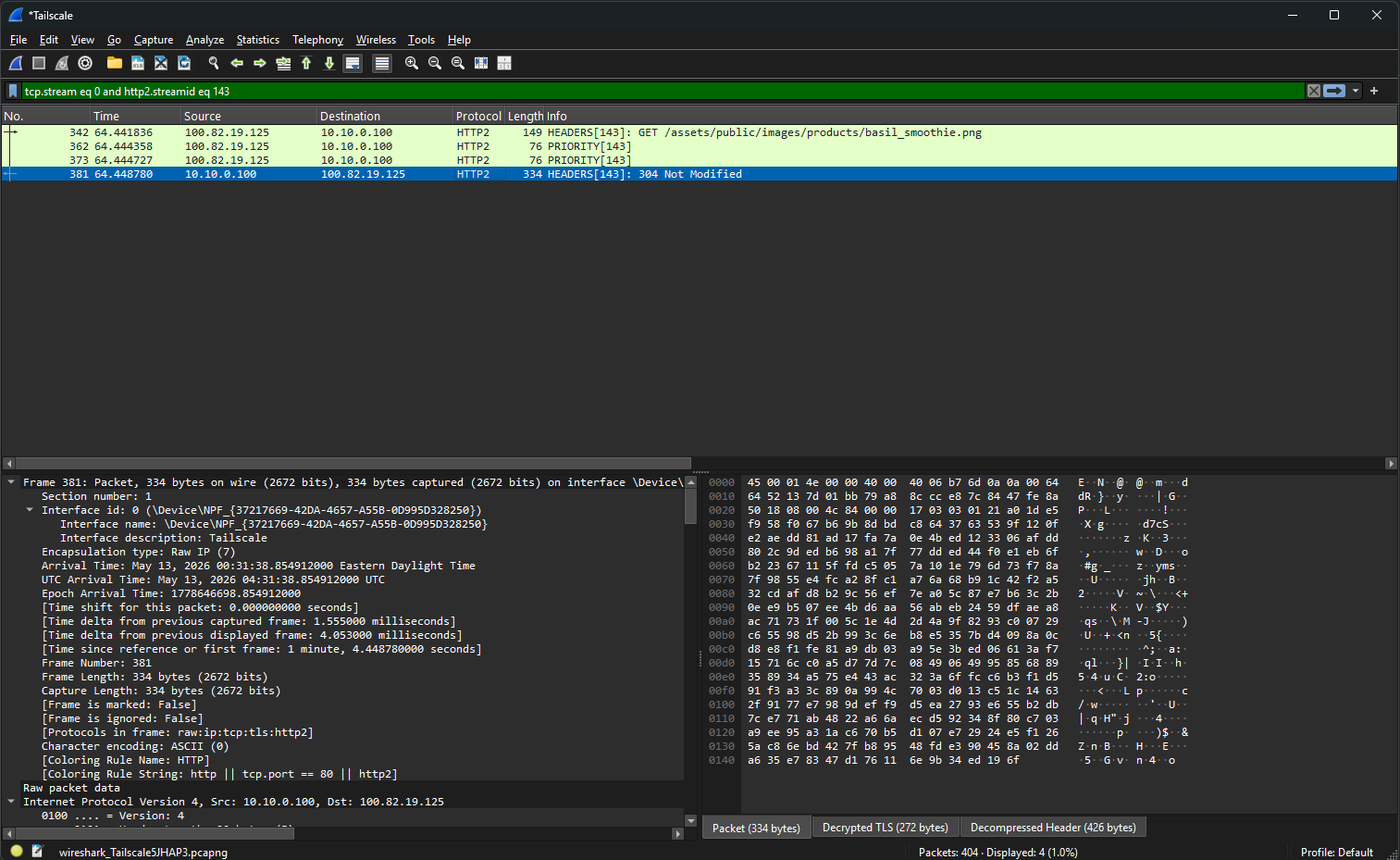
Decrypted TLS (272 bytes) tab at the bottom of the packet detail pane.What the Decrypted Traffic Shows
This is where the demo earns its weight. The traffic in Wireshark before the keylog is loaded is just TLS Application Data records, opaque ciphertext, exactly what TLS is supposed to look like to a network observer. The moment the keylog is referenced in TLS preferences, the same packets render as fully decoded HTTP/2 streams with everything visible.
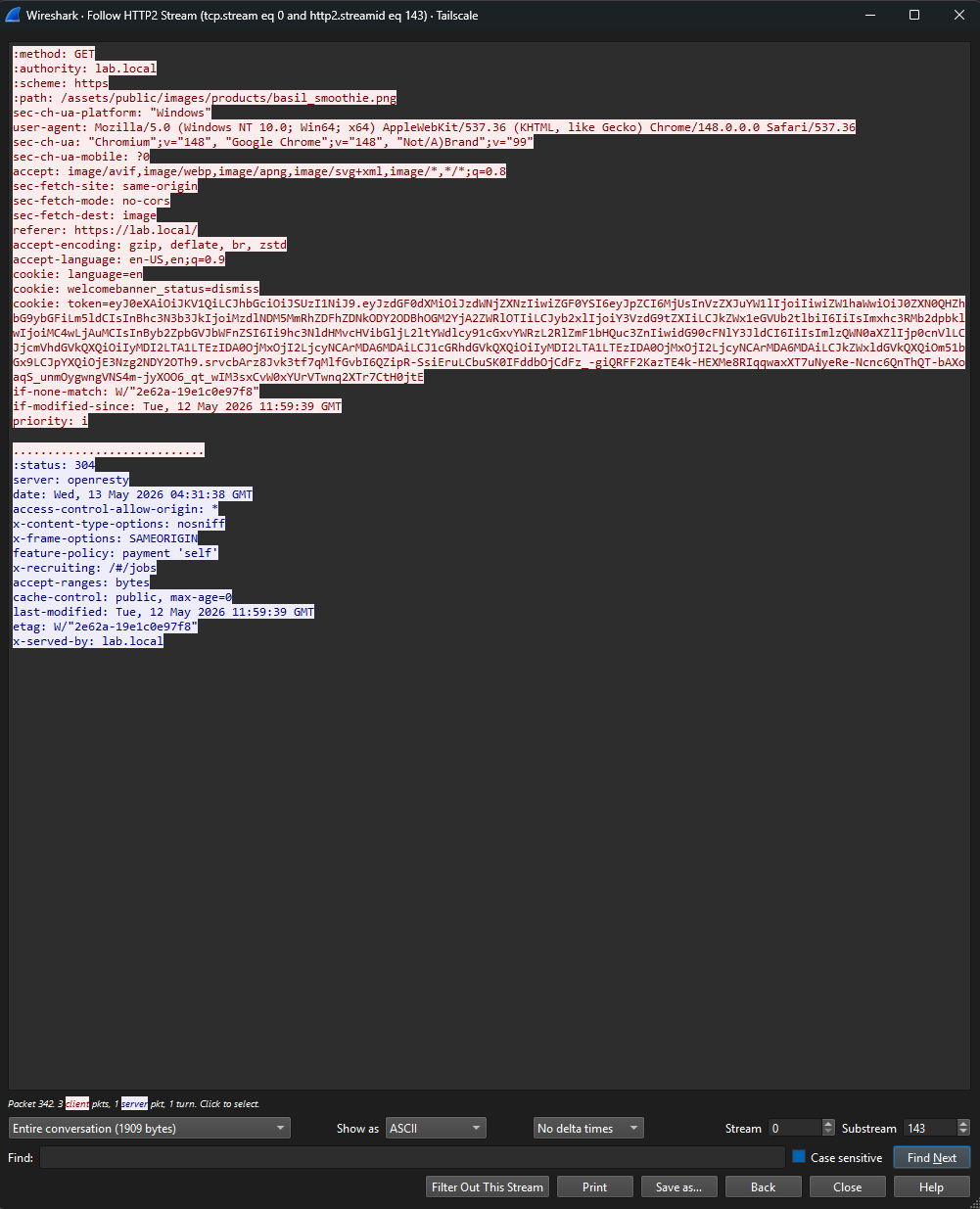
What I could see in the follow-stream view:
- The HTTP/2 pseudo-headers (
:method: GET,:authority: lab.local,:scheme: https,:path: /assets/...) — the protocol envelope in plaintext - Full browser fingerprint headers (
user-agent,sec-ch-ua,accept-language) — every header a passive network observer would never see - The session cookie containing a JWT:
token=eyJ0eXAiOiJKV1Qi... - Response headers including
server: openresty(NPM's underlying engine) and the Juice Shop signaturex-recruiting: /#/jobs
The JWT was the interesting one. Standard three-section base64 structure separated by dots. Pasted into jwt.io to decode the payload (offline alternative: a PowerShell one-liner that splits on dots, base64-decodes the middle section, and pretty-prints the JSON).
Inside the JWT
The decoded payload from my lab account:
{
  "status": "success",
  "data": {
    "id": 24,
    "email": "[email protected]",
    "password": "2ce83e50df47ac7faf93bc8654d7ee88",
    "role": "customer",
    "deluxeToken": "",
    "lastLoginIp": "0.0.0.0",
    "profileImage": "/assets/public/images/uploads/default.svg",
    "totpSecret": "",
    "isActive": true,
    "createdAt": "2026-05-13 03:59:45.795 +00:00",
    "updatedAt": "2026-05-13 03:59:45.795 +00:00",
    "deletedAt": null
  },
  "iat": 1778644805
}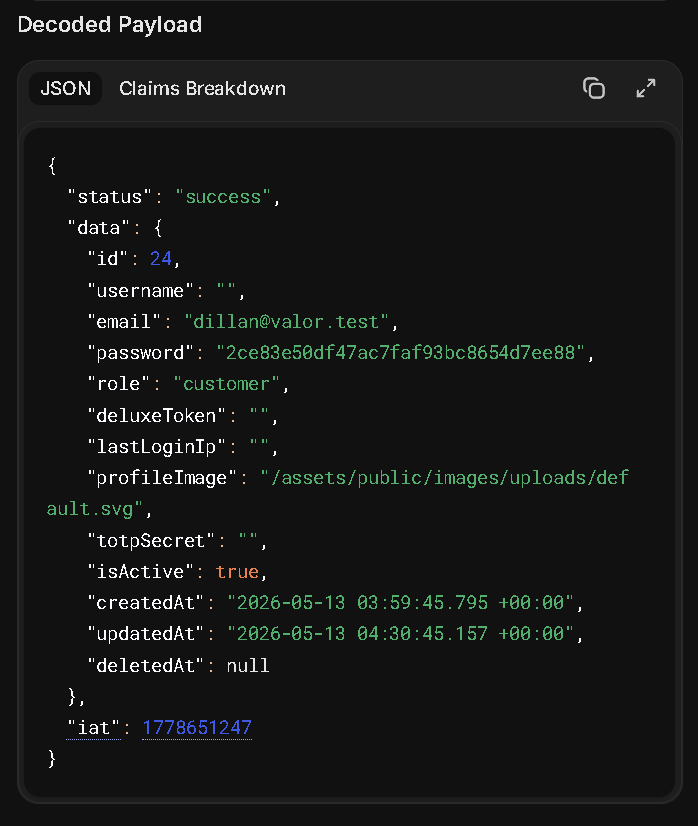
totpSecret field — and the iat claim has no matching exp.Three things stand out immediately, and they each tell a different security story.
The token doesn't just carry the minimum needed for authorization (subject ID, role, expiry). It carries the entire user object including fields the client doesn't need like totpSecret, lastLoginIp, and deletedAt. JWTs are visible to anyone who has the token. Putting your full user table row in there leaks information that should never leave the server.
The token literally embeds the user's password hash. Even if the hashing algorithm were strong, this exposes the hash to anyone who can intercept or steal the token. Now anyone with network access (or any other way to get the JWT) can take this hash offline for cracking attempts. The hash should never have been near the client.
iat claim but no exp claim.
The token has an issued-at timestamp but no expiration. Per the JWT spec that means the token never expires. In practice, anyone who steals this token can use it indefinitely. No rotation, no forced re-auth, no compensating control. This is a real-world JWT design pattern I've seen ship to production.
Identifying the Hash
Before trying to do anything with the hash, I needed to know what algorithm produced it. Hashes have shape, and the shape narrows down the algorithm fast.
Hash shape quick reference
- 32 hex chars, no prefix → MD5, NTLM, or MD4 (MD5 is by far the most common)
- 40 hex chars, no prefix → SHA-1
- 64 hex chars, no prefix → SHA-256
- Starts with
$2a$,$2b$,$2x$, or$2y$→ bcrypt (with cost factor and salt embedded) - Starts with
$argon2→ Argon2 (current best-practice for password storage) - Starts with
$6$→ SHA-512 crypt - Starts with
$7$→ scrypt
The hash from the JWT was 2ce83e50df47ac7faf93bc8654d7ee88. Exactly 32 hex characters, no $ prefix, no embedded salt. That's the MD5 fingerprint. To rule out the ambiguous cases (NTLM and MD4 also produce 32 hex), context helps: this is a web application storing user passwords, NTLM is a Windows network authentication hash, MD4 hasn't been used for password storage in decades. Web app + 32 hex = MD5 with very high confidence.
That alone is a finding. MD5 has been considered cryptographically broken for password hashing since at least 2012. The modern recommendations are bcrypt, scrypt, or Argon2, all of which are designed specifically to be slow and computationally expensive precisely to resist brute-force attacks. Plain MD5 is the opposite of slow: it's optimized for speed, which is exactly what an attacker wants. Juice Shop uses MD5 deliberately as a lesson, but it's a finding I've seen in real legacy SMB applications more than once.
Verifying the Hash Chain
To prove the chain end-to-end before going further, I dropped my registered password into CyberChef with MD5 as the recipe. The output matched the hash from the JWT byte for byte. That confirmed every link:
- I typed a password into Chrome's registration form on Juice Shop
- Juice Shop hashed it with MD5 and stored that in its database
- On login, Juice Shop wrote the full user record (including that hash) into a JWT
- SSLKEYLOGFILE on my workstation captured the TLS session keys
- Wireshark used those keys to decrypt the captured HTTP/2 stream
- The JWT pulled from the decrypted cookie decoded to plain JSON
- Hashing the original password forward produced the same hex string as the one in the JWT
I made a small mistake on my first CyberChef attempt that's worth flagging because it's a common confusion. My first instinct was to paste the hash into the input field and run MD5 on it, expecting some kind of decode. That doesn't work, because MD5 is one-way. Running MD5 on the hash just produced another MD5 of the hash. The correct workflow is to put the candidate password as the input and MD5 as the recipe, then compare the output to the target hash. Trivial point, but I bring it up because I keep seeing this exact confusion in IT spaces and it's worth the reminder: hashing is not encryption, and there's nothing to decrypt.
Trying to Actually Crack It
The forward-hash match proved the chain works. The next question is the one a real attacker would ask: with the hash in hand, how recoverable is the original password? This is where the post got more interesting than I expected.
The password I'd registered with for this lab was F1nDMyP@55w0rd. Fourteen characters, mixed case, numbers, special character. The kind of thing most corporate password policies would happily accept and most users would think of as "strong." (To be clear: this is a one-off password created for this lab account and nothing else. I'm publishing it because the whole point of the post is to show what an attacker has to do to recover it.)
Step 1: Crackstation
First stop for any hash is always a precomputed lookup. Crackstation has indexed the hashes of every common password it could get its hands on (rockyou, breach corpora, common patterns) and serves them as instant lookups. If the password is in there, you get the plaintext in milliseconds without spending a single GPU cycle.
Pasted in the hash. Result:
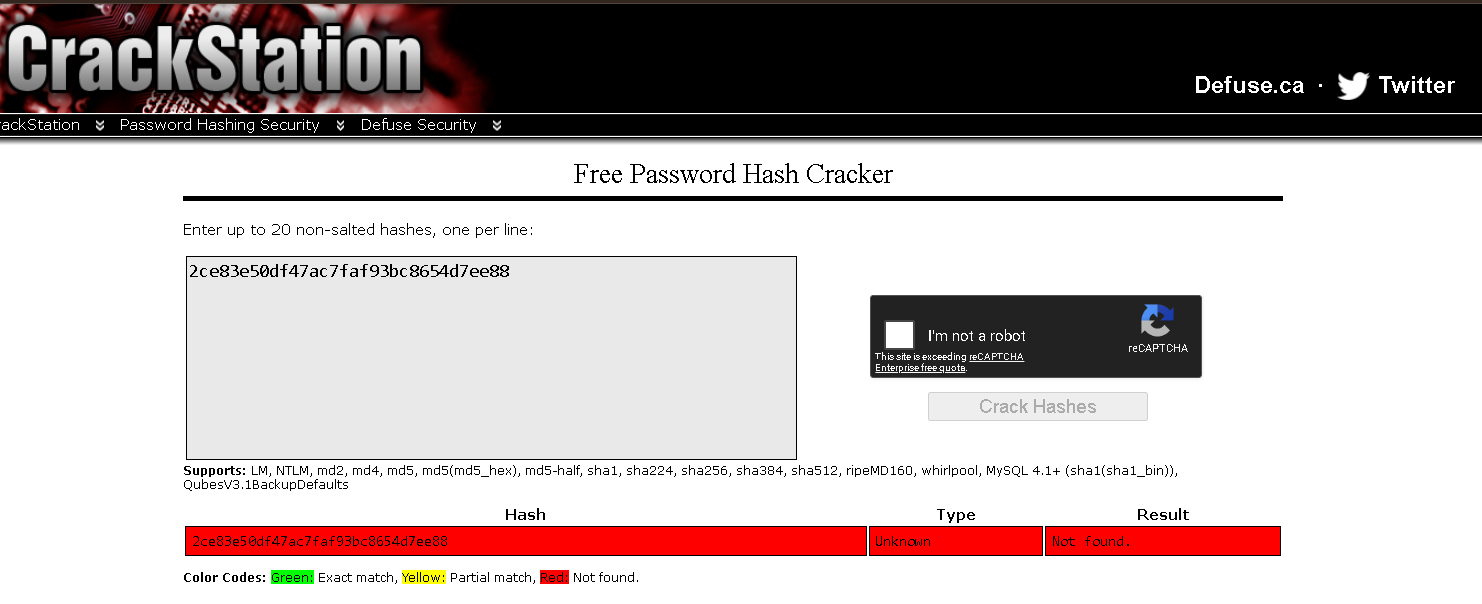
Good sign for the password. It's not in any of the wordlists Crackstation has precomputed. The "Unknown" hash type label is a bit misleading: it just means none of their MD5 lookups produced a hit, so they couldn't confirm the algorithm. The hash is clearly MD5 by shape, they just can't reverse-confirm by finding a known plaintext.
Step 2: Hashcat Setup
For anything Crackstation can't lookup, the next stop is hashcat with a real GPU. Hashcat is the industry-standard offline password cracking tool. Runs on Windows natively, uses CUDA on NVIDIA cards or HIP on AMD, and ships with hundreds of attack modes and rule sets.
My workstation has an RTX 3060 with 12GB VRAM and an integrated AMD Radeon as a second OpenCL device. For MD5 specifically, the 3060 should hit roughly 8–10 GH/s once optimized kernels are enabled. That's 8 to 10 billion candidate passwords per second.
Install was straightforward. Download the 7z from hashcat.net, extract to C:\Tools\HashCat\, write the target hash to a file:
[System.IO.File]::WriteAllText("C:\Tools\hash.txt", "2ce83e50df47ac7faf93bc8654d7ee88")Out-File -Encoding ASCII isn't actually clean.
My first attempt to write the hash file used Out-File, and hashcat rejected it with Token length exception. The file looked correct, but PowerShell had added a UTF-8 BOM or trailing newline that hashcat counted as part of the hash, making it the wrong length. [System.IO.File]::WriteAllText() writes raw bytes with no BOM and no trailing newline. Always use that for hashcat inputs on Windows.
For the wordlist, I grabbed SecLists from GitHub. The classic starting wordlist is rockyou.txt at SecLists/Passwords/Leaked-Databases/rockyou.txt.tar.gz. 14,344,391 passwords leaked from the 2009 RockYou breach. It's been the standard cracking benchmark for over fifteen years because it represents real human password choices at scale.
Step 3: Straight Wordlist Attack
The simplest attack. Try every password in rockyou.txt directly, no transformations, see if mine is one of them.
.\hashcat.exe -m 0 -a 0 C:\Tools\hash.txt `
  C:\Tools\SecLists\Passwords\Leaked-Databases\rockyou.txt
Flags: -m 0 = MD5 hash mode, -a 0 = dictionary attack.
Six seconds to chew through all 14 million leaked passwords, zero matches. My password isn't in rockyou. Not surprising. The base form would have to be a real concatenated phrase to match, and rockyou is mostly single words and common phrases.
Step 4: Wordlist + Rules
Rules are hashcat's force multiplier. A rule is a small transformation (capitalize first letter, append a number, swap a character) that gets applied to every word in the wordlist. With a rule file containing 64 transformations, every word in rockyou becomes 64 candidates. With 99,000 transformations, every word becomes 99,000 candidates.
The classic starting rule set is best64.rule. In hashcat 7.x it's been renamed to best66.rule with two additional transformations. Lives at rules\best66.rule inside the hashcat directory.
I also added -O for optimized kernels (5–10x faster on MD5, caps password length at 31 characters which is irrelevant here):
.\hashcat.exe -m 0 -a 0 -O C:\Tools\hash.txt `
  C:\Tools\SecLists\Passwords\Leaked-Databases\rockyou.txt `
-r rules\best66.ruleStill no match. best66 includes things like "capitalize first letter," "append a digit 0 through 9," "reverse," "toggle case of one character." Common patterns that catch most lazy passwords. None of them caught mine.
Step 5: Dive.rule (The Big One)
Time to escalate to the aggressive rule set. dive.rule contains 98,670 rules. Combined with rockyou's 14.3 million words, that produces a keyspace of 1,415,360,369,280 candidates. That's 1.4 trillion. Most "is this password crackable in practice" questions get answered by dive.rule.
.\hashcat.exe -m 0 -a 0 -O C:\Tools\hash.txt `
  C:\Tools\SecLists\Passwords\Leaked-Databases\rockyou.txt `
  -r rules\dive.rule
The RTX 3060 ran sustained at ~7 GH/s combined with the integrated AMD GPU helping. The full 1.4 trillion candidate keyspace exhausted in exactly 3 minutes.
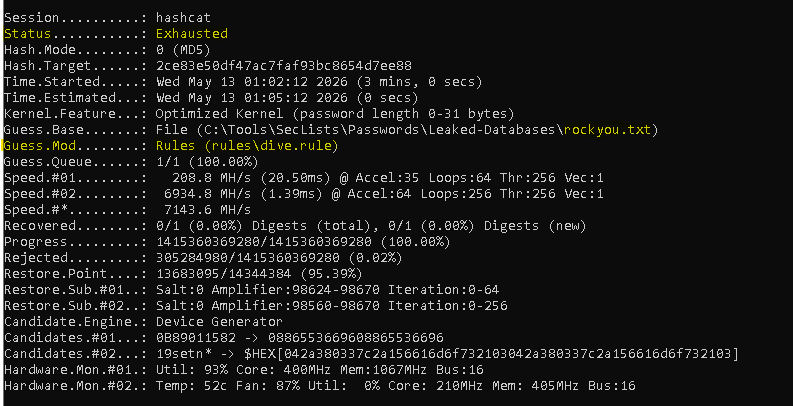
This is where the post would have ended if I had stopped at "the encryption was the weak link." Generic offline cracking against my password, with the industry-standard tooling and a respectable consumer GPU, hit a wall. If an attacker had stolen this hash from a breach dump and run dive against it, they would have moved on to easier targets.
But I knew my own password. So I switched hats and tried a different attack.
Step 6: Naive Targeted Attack
The shift here is important. Generic attacks throw the kitchen sink at a hash. Targeted attacks make educated guesses about the password's structure and try to invert that specific structure.
My password is F1nDMyP@55w0rd. The structure is clearly "Find My Password" with leetspeak substitutions: i → 1, a → @, s → 5, o → 0. If an attacker guessed the phrase, they could feed it through a leetspeak-focused rule set.
# Build a single-word wordlist with just the base phrase
[System.IO.File]::WriteAllText("C:\Tools\custom.txt", "findmypassword")

# Throw it at the Incisive leetspeak rule set
.\hashcat.exe -m 0 -a 0 -O C:\Tools\hash.txt C:\Tools\custom.txt -r rules\Incisive-leetspeak.ruleFailed. I assumed Incisive would cover the substitution pattern, and it does, but my password has more going on than just leetspeak.
Look at the capitalization carefully:
F 1 n D M y P @ 5 5 w 0 r d
↑     ↑ ↑   ↑
Four capital letters. F at position 0, D at position 3, M at position 4, P at position 6. Those positions aren't random. They line up exactly with the word boundaries of the underlying phrase: Find My Password. I PascalCased the phrase before applying leetspeak, but the words are concatenated so the capitalizations land mid-string rather than at obvious word breaks.
The Incisive leetspeak rules don't know to look for word boundaries inside concatenated phrases. They apply leetspeak substitutions and sometimes capitalize position 0, but not mid-string capitalizations at specific positions. My naive targeted attack failed for the same reason the generic attack failed: the rule set didn't model my specific pattern.
Step 7: Precise Targeted Attack
This is the attack that works. Building a custom rule that exactly replicates my transformation chain.
Trace the transformation through:
- Start:
findmypassword - Capitalize position 0 (
c):Findmypassword - Toggle case at position 3 (
T3):FinDmypassword - Toggle case at position 4 (
T4):FinDMypassword - Toggle case at position 6 (
T6):FinDMyPassword - Substitute
iwith1(si1):F1nDMyPassword - Substitute
awith@(sa@):F1nDMyP@ssword - Substitute
swith5(ss5):F1nDMyP@55word - Substitute
owith0(so0):F1nDMyP@55w0rd
That's the rule. Eight steps. Save as a one-line custom rule file:
[System.IO.File]::WriteAllText("C:\Tools\HashCat\hashcat-7.1.2\rules\custom-leet.rule", "c T3 T4 T6 si1 sa@ ss5 so0")

.\hashcat.exe -m 0 -a 0 -O C:\Tools\hash.txt C:\Tools\custom.txt -r rules\custom-leet.rule2ce83e50df47ac7faf93bc8654d7ee88:F1nDMyP@55w0rd · Recovered: 1/1 (100.00%) · 1 candidate tested.
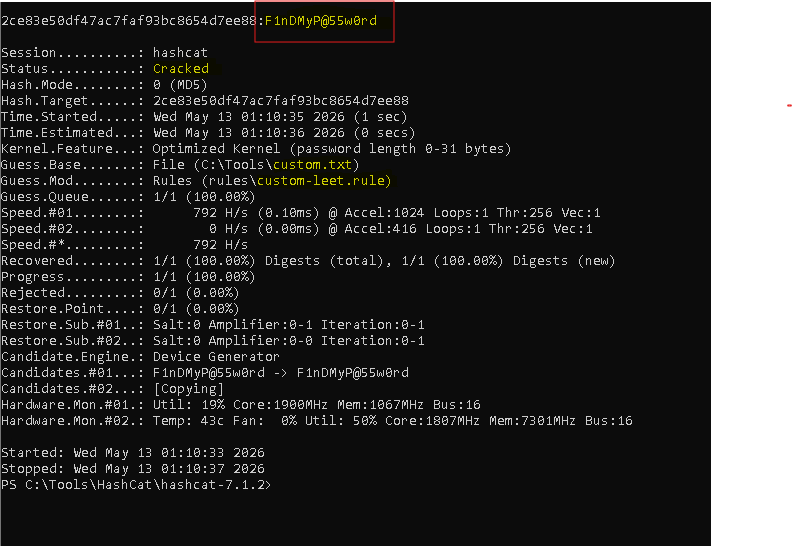
One word in the wordlist. One rule. One match. 1.4 trillion candidates couldn't get it, but the right single candidate did.
The Thesis: No Password is Uncrackable
Stack the results next to each other and the lesson is unavoidable:
What it took to crack my password
- Crackstation lookup → no match
- rockyou.txt straight wordlist → no match (14M candidates)
- rockyou.txt + best66.rule → no match (947M candidates)
- rockyou.txt + dive.rule → no match (1.4T candidates in 3 minutes)
- findmypassword + Incisive-leetspeak.rule → no match (naive targeted attack)
- findmypassword + hand-built rule → CRACKED in 1 second
The first five attempts taught me my password was strong against generic attacks. The sixth attempt taught me that "strong against generic attacks" isn't the same thing as "uncrackable."
Every password has a structure. Every structure can be modeled as a rule. The only question is whether anyone with enough motivation and pattern insight ever builds the rule that matches yours. Today nobody has. Tomorrow somebody might. The hash sitting in your database is the same hash either way.
This is the part that doesn't get talked about enough in the "strong password" conversation. A 14-character password with mixed case, numbers, and symbols sounds airtight in a corporate IT policy. It survives every standard rule set in hashcat. It survives 1.4 trillion candidates on a consumer GPU in 3 minutes. And it falls to a single hand-crafted rule that knows the pattern. That rule didn't exist before tonight. It exists now, written into the cracking community's collective vocabulary the moment I published it here.
The defense isn't complexity. Complexity buys you time against generic attacks. The real defense is uniqueness combined with randomness:
- Random passwords from a password manager. No pattern to invert, no rule that catches them, no transferable insight if one of them is compromised.
- One password per service. If you have a pattern, a breach of one service exposes the pattern, which then makes every other service one rule away.
- Multi-factor authentication on top of all of it. Because if any of the above fails, MFA buys you a recovery window.
"Memorable strong password" is a contradiction in the long run. Memorable means there's a pattern. Pattern means the password is one rule away from cracked. The only way to break that chain is to stop relying on a memorable string in the first place.
The Detection Angle
The reason the SSLKEYLOGFILE technique matters operationally isn't that pen testers use it (they do, but they have access by definition). The reason it matters is that some commodity infostealers abuse the exact same mechanism. If an attacker can set SSLKEYLOGFILE on a user's session and either read the file later or exfiltrate it, they can passively capture and decrypt that user's HTTPS traffic as long as they also have network visibility (or get the user to install a "diagnostic" tool that captures traffic locally).
Worth hunting for in SentinelOne DVQL, or whatever SIEM you have on the endpoint logs. The patterns to watch for:
- Process creation events with command lines that explicitly set
SSLKEYLOGFILE - Registry value modifications under
HKLM\System\CurrentControlSet\Control\Session Manager\Environmentor the per-user equivalent where the value name isSSLKEYLOGFILE - Unusual file writes to paths that look like keylog targets (anything named
*.login a temp directory that's growing during active browser usage is suspicious)
None of these is a sure indicator on its own. Developers and security researchers legitimately set the env var for debugging. But on a production workstation with no developer profile, an unprompted SSLKEYLOGFILE environment variable showing up is worth a second look, especially if it correlates with browser activity that follows.
Lessons Learned
The endpoint is always inside the trust boundary, and that's by design. TLS protects against passive observers on the network path. It does not protect against the endpoints participating in the conversation, because those endpoints need the plaintext to do their job. SSLKEYLOGFILE is the formal way to share that fact with analysis tools. It's not a flaw, it's a feature, and trying to design around it usually misunderstands the threat model.
Where you capture matters as much as what you capture. My Tailscale subnet router silently changed the route to the lab subnet, and the right capture interface turned out to be virtual rather than physical. Find-NetRoute is the cleanest way to answer "which interface is Windows actually using to reach this host" before committing to a capture.
Self-hosting the target made the demo cleaner. If I'd captured against a real third-party site, the screenshots would have been awkward and the findings less educational. With Juice Shop running in my lab, I could plant exactly the kind of data that makes the security thesis visible, without ethical or legal noise.
The JWT design is the real attack surface, not the TLS. Once I could see the inside of the session traffic, the encryption story stopped being interesting. The interesting stuff was the implementation choices: full user record in the token, MD5 hashing, no expiry. Those are the findings a real engagement would put on a report. The decryption was just the access mechanism that made them visible.
Generic strength is not absolute strength. My password survived every attack a hashcat user would throw at it by default. That's not the same as being uncrackable. It's the same as being uncracked yet. Once the pattern was known, the password fell to one rule in one second. Every password has a "right rule." Some of those rules are already written and shipped in standard rule sets. Some are still waiting to be written by the first attacker who happens to think about your specific pattern.
Use a password manager. The only password discipline that doesn't have a rule that defeats it is "no pattern at all, generated randomly per service." That's the actual takeaway from this whole exercise. Memorable strong passwords are a worse defense than people think. The generic-attack survival rate looks great. The targeted-attack survival rate is the real number, and it trends toward zero given enough time and pattern exposure.
Conclusion
The video that kicked this off framed TLS key logging as some kind of clever trick or vulnerability. It's neither. It's a debugging feature in every modern TLS stack that exists because endpoints sometimes need to share their session keys with analysis tools running locally. The "trick" is being one of the endpoints, which means having the plaintext you're trying to look at.
What I didn't expect was how much the cracking arc would steal the show. Building the TLS lab was supposed to be the post. Pulling the JWT and finding the MD5 hash was supposed to be the finding. Cracking the hash was supposed to be a footnote: "and obviously this MD5 is recoverable, so the encryption was the weakest link in the chain." Except the encryption wasn't the weakest link. The encryption did its job perfectly, twice (TLS and WireGuard). The password discipline did its job too, holding off 1.4 trillion candidates. The thing that actually broke was the moment I switched from generic attack to targeted attack with insight into my own pattern.
That's the security industry's quiet truth about password storage. The hashing matters less than people think. The password complexity matters less than people think. What matters most is whether anyone with enough motivation ever sits down and models your specific structure into a rule. Today they haven't. Tomorrow they might. The hash sitting in someone else's database doesn't care about the difference.
If you take one thing from this post, take this: every password is eventually crackable. The only question is whether the rule that cracks it has been written yet. That's why password managers exist. That's why MFA exists. That's why per-service uniqueness matters even when each individual password looks strong on its own. The defense isn't a stronger string. The defense is making sure no single string is worth the effort of building the rule.
If you've got a homelab and an evening, this is a good build to run yourself. It reframed how I explain TLS to people, and the next time I'm in a conversation where someone says "but it's a strong password, it's safe," I'll have a screenshot that shows 1.4 trillion candidates exhausted in 3 minutes followed by a 1-second crack with the right rule. Same hash both times. Same password both times. Different attacker, different outcome.